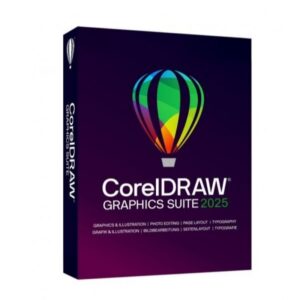
CorelDRAW Graphics Suite 2025 provides a complete design environment for creating high-quality print and digital projects. Built for designers, illustrators, marketing teams, and print professionals, it combines powerful vector illustration tools, precise layout features, and advanced photo editing capabilities in one integrated suite.
The 2025 edition delivers enhanced performance, improved non-destructive editing workflows, expanded file compatibility, and optimized handling of complex design files. Whether you’re creating logos, packaging, branding materials, signage, web graphics, or multi-page publications, CorelDRAW Graphics Suite 2025 offers precision, speed, and full creative control.
Key Features & Benefits:
Advanced Vector Illustration – Design scalable logos, icons, and detailed artwork with professional tools.
Professional Page Layout – Create brochures, catalogs, magazines, and marketing materials.
Powerful Photo Editing – Enhance and retouch images with non-destructive adjustments.
Typography & Font Tools – Advanced OpenType support and font management.
Wide File Compatibility – Supports AI, PSD, PDF, SVG, JPG, PNG, and other industry-standard formats.
Non-Destructive Effects – Apply effects and corrections without altering original objects.
High-Performance Workflow – Optimized for handling complex and large design projects.
Flexible Licensing Options – Available as perpetual or subscription-based licensing (depending on purchase).
CorelDRAW Graphics Suite 2025 is ideal for creative professionals, agencies, print shops, and businesses seeking a complete and modern graphic design platform.
Installation and Activation
Installation Steps:
Purchase the software and receive download and activation details via email.
Download the installer from the official Corel website.
Run the setup file and follow the installation wizard.
Sign in with your Corel account or enter your product key to activate the software.
Activation Notes:
Requires a valid product license key or active subscription.
Internet connection required for activation and updates.
License validity and device limits depend on the purchased plan.
💡 Activation instructions are provided immediately after purchase.
System Requirements
Operating System: Windows 10 / 11 (64-bit) or supported macOS versions
Processor: Intel Core i5 / AMD equivalent (Intel Core i7 or Apple Silicon recommended)
RAM: 8 GB minimum (16 GB recommended for complex projects)
Storage: 5 GB available disk space
Display: 1280 x 720 resolution or higher
Internet: Required for activation and updates
💡 SSD storage and higher RAM are recommended for optimal performance with large design files.
CorelDRAW Graphics Suite 2025 provides a complete design environment for creating high-quality print and digital projects. Built for designers, illustrators, marketing teams, and print professionals, it combines powerful vector illustration tools, precise layout features, and advanced photo editing capabilities in one integrated suite.
The 2025 edition delivers enhanced performance, improved non-destructive editing workflows, expanded file compatibility, and optimized handling of complex design files. Whether you’re creating logos, packaging, branding materials, signage, web graphics, or multi-page publications, CorelDRAW Graphics Suite 2025 offers precision, speed, and full creative control.
Key Features & Benefits:
Advanced Vector Illustration – Design scalable logos, icons, and detailed artwork with professional tools.
Professional Page Layout – Create brochures, catalogs, magazines, and marketing materials.
Powerful Photo Editing – Enhance and retouch images with non-destructive adjustments.
Typography & Font Tools – Advanced OpenType support and font management.
Wide File Compatibility – Supports AI, PSD, PDF, SVG, JPG, PNG, and other industry-standard formats.
Non-Destructive Effects – Apply effects and corrections without altering original objects.
High-Performance Workflow – Optimized for handling complex and large design projects.
Flexible Licensing Options – Available as perpetual or subscription-based licensing (depending on purchase).
CorelDRAW Graphics Suite 2025 is ideal for creative professionals, agencies, print shops, and businesses seeking a complete and modern graphic design platform.
Installation Steps:
Purchase the software and receive download and activation details via email.
Download the installer from the official Corel website.
Run the setup file and follow the installation wizard.
Sign in with your Corel account or enter your product key to activate the software.
Activation Notes:
Requires a valid product license key or active subscription.
Internet connection required for activation and updates.
License validity and device limits depend on the purchased plan.
💡 Activation instructions are provided immediately after purchase.
Operating System: Windows 10 / 11 (64-bit) or supported macOS versions
Processor: Intel Core i5 / AMD equivalent (Intel Core i7 or Apple Silicon recommended)
RAM: 8 GB minimum (16 GB recommended for complex projects)
Storage: 5 GB available disk space
Display: 1280 x 720 resolution or higher
Internet: Required for activation and updates
💡 SSD storage and higher RAM are recommended for optimal performance with large design files.