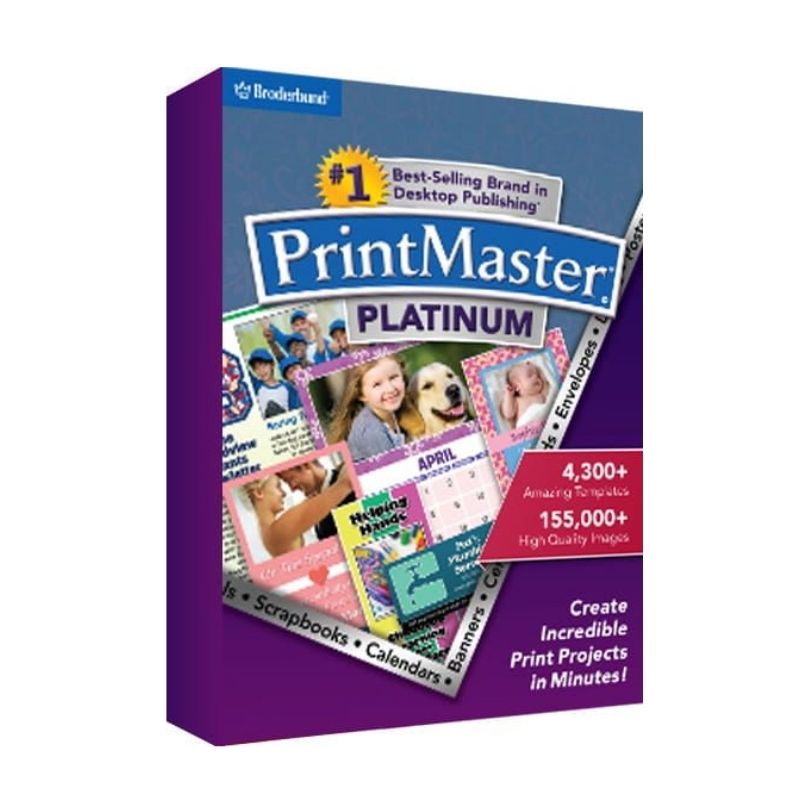
PrintMaster 7 Platinum is a complete creative design solution for home users, hobbyists, and small businesses. It allows you to design greeting cards, invitations, banners, calendars, business cards, brochures, and much more using thousands of ready-made templates and graphics.
The Platinum edition includes advanced layout tools, high-resolution print support, and a vast image and clipart library. With its intuitive drag-and-drop interface, you can easily customize text, images, colors, and layouts to create professional-looking projects for both print and digital use on Windows and Mac systems.
Key Features & Benefits:
Thousands of Templates – Ready-made designs for cards, flyers, labels, and more.
Extensive Clipart & Image Library – Includes a wide collection of high-quality graphics.
Advanced Text & Layout Tools – Customize fonts, spacing, alignment, and effects.
Photo Editing Tools – Add and enhance personal photos within projects.
High-Resolution Printing – Optimized for professional print results.
Multi-Platform Support – Compatible with both Windows and macOS.
Drag-and-Drop Interface – Easy design process for beginners and advanced users.
One-Time Purchase – No subscription required.
PrintMaster 7 Platinum is ideal for anyone looking to create personalized print materials quickly and professionally without complex design software.
Installation and Activation
Installation Steps:
Purchase the software and receive activation details via email.
Download the installer for Windows or Mac from the official source.
Run the setup file and follow the on-screen instructions.
Enter your license key to activate the software.
Activation Notes:
Requires a valid product license key.
Internet connection may be required for activation.
License typically valid for one device unless otherwise specified.
💡 Activation instructions are provided immediately after purchase.
System Requirements
Windows: Windows 10 / 11
macOS: Supported recent macOS versions
Processor: 1 GHz or faster
RAM: 4 GB minimum (8 GB recommended)
Storage: 4 GB available disk space
Printer: Required for physical print projects
💡 Updated printer drivers are recommended for best print quality.
PrintMaster 7 Platinum is a complete creative design solution for home users, hobbyists, and small businesses. It allows you to design greeting cards, invitations, banners, calendars, business cards, brochures, and much more using thousands of ready-made templates and graphics.
The Platinum edition includes advanced layout tools, high-resolution print support, and a vast image and clipart library. With its intuitive drag-and-drop interface, you can easily customize text, images, colors, and layouts to create professional-looking projects for both print and digital use on Windows and Mac systems.
Key Features & Benefits:
Thousands of Templates – Ready-made designs for cards, flyers, labels, and more.
Extensive Clipart & Image Library – Includes a wide collection of high-quality graphics.
Advanced Text & Layout Tools – Customize fonts, spacing, alignment, and effects.
Photo Editing Tools – Add and enhance personal photos within projects.
High-Resolution Printing – Optimized for professional print results.
Multi-Platform Support – Compatible with both Windows and macOS.
Drag-and-Drop Interface – Easy design process for beginners and advanced users.
One-Time Purchase – No subscription required.
PrintMaster 7 Platinum is ideal for anyone looking to create personalized print materials quickly and professionally without complex design software.
Installation Steps:
Purchase the software and receive activation details via email.
Download the installer for Windows or Mac from the official source.
Run the setup file and follow the on-screen instructions.
Enter your license key to activate the software.
Activation Notes:
Requires a valid product license key.
Internet connection may be required for activation.
License typically valid for one device unless otherwise specified.
💡 Activation instructions are provided immediately after purchase.
Windows: Windows 10 / 11
macOS: Supported recent macOS versions
Processor: 1 GHz or faster
RAM: 4 GB minimum (8 GB recommended)
Storage: 4 GB available disk space
Printer: Required for physical print projects
💡 Updated printer drivers are recommended for best print quality.