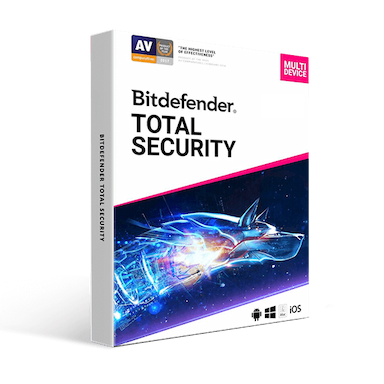
Bitdefender Total Security 2026

Price range: $ 44.71 through $ 178.91

Original price was: $ 145.90.Current price is: $ 17.90.

Original price was: $ 245.22.Current price is: $ 25.95.

Original price was: $ 198.50.Current price is: $ 15.95.

Original price was: $ 99.90.Current price is: $ 15.95.

Product Description

Bitdefender Total Security 2026 – Complete Multi-Device Protection

Bitdefender Total Security 2026 is a comprehensive cybersecurity solution designed to protect your digital life across multiple platforms. With advanced malware detection, real-time protection, and powerful privacy tools, this software safeguards your devices from viruses, ransomware, phishing attacks, and other online threats.

Whether you are using Windows, macOS, Android, or iOS devices, Bitdefender Total Security provides unified protection with minimal impact on system performance. The software combines artificial intelligence, cloud-based threat intelligence, and behavioral detection technology to stop cyber threats before they can harm your system.

Key Features of Bitdefender Total Security 2026

  • Advanced real-time antivirus and anti-malware protection
  • Multi-layer ransomware protection and file recovery tools
  • Anti-phishing and anti-fraud website protection
  • Secure VPN with encrypted internet traffic
  • Parental control tools for family safety
  • Firewall protection against network attacks
  • Anti-theft protection for laptops and mobile devices
  • Performance optimization tools to speed up your devices
  • Secure online banking with protected browser
  • Password management and encrypted storage

Advanced Security Technologies Included

Real-Time Threat Protection

Bitdefender continuously monitors your system for suspicious activity using advanced behavioral detection. This allows the software to identify and block malware, spyware, trojans, rootkits, and zero-day threats before they can infect your device.

Multi-Layer Ransomware Protection

Ransomware attacks can encrypt important files and demand payment for recovery. Bitdefender’s advanced ransomware defense prevents unauthorized encryption and protects your documents, photos, and other critical files.

Network Threat Prevention

The network threat prevention technology detects suspicious activity and blocks attempts to exploit vulnerabilities within your system. It protects against brute-force attacks, malicious URLs, and botnet activities.

Secure VPN and Online Privacy

Bitdefender includes a secure VPN service that encrypts internet traffic, helping protect your online privacy when browsing, banking, or using public Wi-Fi networks.

Safe Banking with Secure Browser

The built-in secure browser protects financial transactions by isolating your banking sessions from potential malware and preventing data interception.

Password Manager and Data Protection

Store passwords, credit card information, and other sensitive data securely in an encrypted vault. The password manager helps generate strong passwords and automatically fill login forms securely.

Multi-Device Platform Support

Bitdefender Total Security 2026 is designed to protect multiple devices across different operating systems.

  • Windows PCs and laptops
  • Mac computers
  • Android smartphones and tablets
  • iPhone and iPad devices

Depending on the license selected, the software can protect several devices simultaneously, making it ideal for individuals and families.

Performance Optimization Features

Bitdefender is engineered for strong protection with minimal system impact. Its cloud-based detection technology offloads intensive scanning tasks to the cloud, keeping your system fast and responsive.

  • OneClick Optimizer to improve device performance
  • Game Mode, Movie Mode, and Work Mode for uninterrupted activity
  • Battery-saving features for laptops
  • Autopilot security advisor for automated protection

System Requirements

Windows

  • Windows 10 or Windows 11
  • Minimum 2 GB RAM
  • 2.5 GB available disk space
  • Internet connection required for updates

macOS

  • macOS 10.15 or later
  • 1 GB RAM minimum
  • 1 GB available storage

Mobile Devices

  • Android 6.0 or later
  • iOS 13 or later
  • Internet connection required

Installation & Activation

  1. Create or sign in to your Bitdefender Central account.
  2. Download Bitdefender Total Security for your device.
  3. Install the software on your computer or mobile device.
  4. Enter the activation code received after purchase.
  5. Activate the product and begin protecting your devices.

Scope of Delivery

  • Original Bitdefender Total Security 2026 license key
  • Digital download link
  • Installation and activation instructions
  • Secure digital invoice

Why Buy Bitdefender Total Security 2026 from Keys Experts

At Keys Experts, we provide genuine software licenses with fast and reliable delivery.

  • 100% genuine software licenses
  • Instant digital delivery by email
  • Competitive pricing
  • Secure online checkout
  • Professional customer support

Frequently Asked Questions

How will I receive my Bitdefender Total Security license?

After completing your purchase, the activation key and download instructions will be sent to your email instantly.

Can I use this license on multiple devices?

Yes. Depending on the version purchased, Bitdefender Total Security can protect multiple devices across different operating systems.

Is this a genuine Bitdefender license?

Yes. All products sold by Keys Experts are genuine licenses intended for activation through official Bitdefender channels.

Does Bitdefender support Windows and Mac?

Yes. Bitdefender Total Security supports Windows PCs, macOS computers, Android devices, and iOS devices.

Can I renew my subscription later?

Yes. You can renew your subscription through your Bitdefender account whenever you choose.

Related Security Software

You may also be interested in other security solutions available in our store:

Installation Steps:

  1. Go to central.bitdefender.com and sign in or create an account.
  2. Click on My Subscriptions > Activate with code and enter your product key.
  3. Download the appropriate installer for your device (Windows, macOS, Android, or iOS).
  4. Run the installer and follow the on-screen setup instructions.
  5. Once installed, sign in with your Bitdefender Central account to activate protection.

Activation Steps:

  1. After installation, open the Bitdefender app on your device.
  2. Log in with your Bitdefender Central account.
  3. Your device will automatically sync and activate based on your subscription.

💡 You can manage all devices, licenses, and settings from your Bitdefender Central dashboard.

💡 If you purchased a multi-device license, repeat the process on other devices under the same account.

  • Operating Systems:
    – Windows 11, 10, 8.1, 7 SP1+
    – macOS 10.15 (Catalina) or later
    – Android 5.0 or later
    – iOS 12.0 or later
  • Processor:
    – Dual-core 1.6 GHz or faster
  • RAM:
    – 2 GB minimum (4 GB recommended)
  • Storage:
    – At least 2.5 GB of free disk space
  • Internet Connection:
    – Required for installation, updates, cloud-based scanning, and VPN

💡 Ensure your devices meet the minimum system requirements for optimal performance and complete protection.
Bitdefender Total Security 2026 – Complete Multi-Device Protection

Bitdefender Total Security 2026 is a comprehensive cybersecurity solution designed to protect your digital life across multiple platforms. With advanced malware detection, real-time protection, and powerful privacy tools, this software safeguards your devices from viruses, ransomware, phishing attacks, and other online threats.

Whether you are using Windows, macOS, Android, or iOS devices, Bitdefender Total Security provides unified protection with minimal impact on system performance. The software combines artificial intelligence, cloud-based threat intelligence, and behavioral detection technology to stop cyber threats before they can harm your system.

Key Features of Bitdefender Total Security 2026

  • Advanced real-time antivirus and anti-malware protection
  • Multi-layer ransomware protection and file recovery tools
  • Anti-phishing and anti-fraud website protection
  • Secure VPN with encrypted internet traffic
  • Parental control tools for family safety
  • Firewall protection against network attacks
  • Anti-theft protection for laptops and mobile devices
  • Performance optimization tools to speed up your devices
  • Secure online banking with protected browser
  • Password management and encrypted storage

Advanced Security Technologies Included

Real-Time Threat Protection

Bitdefender continuously monitors your system for suspicious activity using advanced behavioral detection. This allows the software to identify and block malware, spyware, trojans, rootkits, and zero-day threats before they can infect your device.

Multi-Layer Ransomware Protection

Ransomware attacks can encrypt important files and demand payment for recovery. Bitdefender’s advanced ransomware defense prevents unauthorized encryption and protects your documents, photos, and other critical files.

Network Threat Prevention

The network threat prevention technology detects suspicious activity and blocks attempts to exploit vulnerabilities within your system. It protects against brute-force attacks, malicious URLs, and botnet activities.

Secure VPN and Online Privacy

Bitdefender includes a secure VPN service that encrypts internet traffic, helping protect your online privacy when browsing, banking, or using public Wi-Fi networks.

Safe Banking with Secure Browser

The built-in secure browser protects financial transactions by isolating your banking sessions from potential malware and preventing data interception.

Password Manager and Data Protection

Store passwords, credit card information, and other sensitive data securely in an encrypted vault. The password manager helps generate strong passwords and automatically fill login forms securely.

Multi-Device Platform Support

Bitdefender Total Security 2026 is designed to protect multiple devices across different operating systems.

  • Windows PCs and laptops
  • Mac computers
  • Android smartphones and tablets
  • iPhone and iPad devices

Depending on the license selected, the software can protect several devices simultaneously, making it ideal for individuals and families.

Performance Optimization Features

Bitdefender is engineered for strong protection with minimal system impact. Its cloud-based detection technology offloads intensive scanning tasks to the cloud, keeping your system fast and responsive.

  • OneClick Optimizer to improve device performance
  • Game Mode, Movie Mode, and Work Mode for uninterrupted activity
  • Battery-saving features for laptops
  • Autopilot security advisor for automated protection

System Requirements

Windows

  • Windows 10 or Windows 11
  • Minimum 2 GB RAM
  • 2.5 GB available disk space
  • Internet connection required for updates

macOS

  • macOS 10.15 or later
  • 1 GB RAM minimum
  • 1 GB available storage

Mobile Devices

  • Android 6.0 or later
  • iOS 13 or later
  • Internet connection required

Installation & Activation

  1. Create or sign in to your Bitdefender Central account.
  2. Download Bitdefender Total Security for your device.
  3. Install the software on your computer or mobile device.
  4. Enter the activation code received after purchase.
  5. Activate the product and begin protecting your devices.

Scope of Delivery

  • Original Bitdefender Total Security 2026 license key
  • Digital download link
  • Installation and activation instructions
  • Secure digital invoice

Why Buy Bitdefender Total Security 2026 from Keys Experts

At Keys Experts, we provide genuine software licenses with fast and reliable delivery.

  • 100% genuine software licenses
  • Instant digital delivery by email
  • Competitive pricing
  • Secure online checkout
  • Professional customer support

Frequently Asked Questions

How will I receive my Bitdefender Total Security license?

After completing your purchase, the activation key and download instructions will be sent to your email instantly.

Can I use this license on multiple devices?

Yes. Depending on the version purchased, Bitdefender Total Security can protect multiple devices across different operating systems.

Is this a genuine Bitdefender license?

Yes. All products sold by Keys Experts are genuine licenses intended for activation through official Bitdefender channels.

Does Bitdefender support Windows and Mac?

Yes. Bitdefender Total Security supports Windows PCs, macOS computers, Android devices, and iOS devices.

Can I renew my subscription later?

Yes. You can renew your subscription through your Bitdefender account whenever you choose.

Related Security Software

You may also be interested in other security solutions available in our store:

Installation Steps:

  1. Go to central.bitdefender.com and sign in or create an account.
  2. Click on My Subscriptions > Activate with code and enter your product key.
  3. Download the appropriate installer for your device (Windows, macOS, Android, or iOS).
  4. Run the installer and follow the on-screen setup instructions.
  5. Once installed, sign in with your Bitdefender Central account to activate protection.

Activation Steps:

  1. After installation, open the Bitdefender app on your device.
  2. Log in with your Bitdefender Central account.
  3. Your device will automatically sync and activate based on your subscription.

💡 You can manage all devices, licenses, and settings from your Bitdefender Central dashboard.

💡 If you purchased a multi-device license, repeat the process on other devices under the same account.

  • Operating Systems:
    – Windows 11, 10, 8.1, 7 SP1+
    – macOS 10.15 (Catalina) or later
    – Android 5.0 or later
    – iOS 12.0 or later
  • Processor:
    – Dual-core 1.6 GHz or faster
  • RAM:
    – 2 GB minimum (4 GB recommended)
  • Storage:
    – At least 2.5 GB of free disk space
  • Internet Connection:
    – Required for installation, updates, cloud-based scanning, and VPN

💡 Ensure your devices meet the minimum system requirements for optimal performance and complete protection.

Related products
Language »